Surviving the Spike: How We Scaled Jakarta's Biggest Polytechnic Admission Exam for 440 USD
Lessons from building a resilient Moodle environment with Redis, NFS, Cloud SQL, and GCP Load Balancing

Running a national admission test online is a high-stakes situation. One glitch, one bottleneck, and you’ve got thousands of stressed users (and admins). Last year, our Moodle instance ran on a bare-metal, monolithic server. It lagged near the exam deadline as users rushed to submit, and Moodle auto-submitted expired attempts. I wasn’t involved that day, I was half a day post-spine surgery, but I heard the horror stories. Apache choked, and the decade-old hard disk couldn't keep up.
This year, following the success of migrating our internal LMS to the cloud, I realized we had the blueprint to fix this. If the cloud architecture worked for our daily drivers, why not adapt it for the admission test?
Here is how I built, tuned, and operated a "disposable" high-scale Moodle environment, and why it cost less than a good office chair.
The Strategy: Disposable Infrastructure
Unlike our permanent LMS, this exam system only needed to exist for a short window. This changed the rules of engagement.
- A Clean Slate I started by creating a brand new GCP Project. This wasn't just for organization; it was for security and hygiene. Since admission data is sensitive, isolating it in a dedicated project meant that once the exam was over and the data was backed up, I could nuke the entire project. No lingering permissions, no forgotten buckets.
- The Metrics For capacity planning, I actually had a luxury most admins don't: a hard number. Our registration system showed roughly 4,500 registrants. Our internal LMS regularly handles ~6k - 7k students (with autoscaling) with some breathing room. So, the math was simple: Match the LMS specs. If it can handle 7k daily users, it can handle 4.5k exam takers with a safety margin for stragglers.
Managed Services vs. The Bill
This is where the decision-making gets interesting. For our permanent internal LMS, we don't use managed services like Cloud SQL or Cloud Memory Store (Redis). Why? The pricing. For a 24/7/365 system, the premium for managed databases adds up fast. It made more sense to self-host those on VMs.
But for a one-day event? The calculus flips. I didn't want to spend days tuning a MariaDB config or managing Redis persistence. I wanted stability out of the box. Since I was only paying for the runtime of the exam (and testing), the higher hourly cost of managed services was negligible compared to the time saved.
- Database: Cloud SQL (MariaDB) running on 8 vCPUs / 16GB RAM.
- Cache: Cloud Memorystore (Redis) on the default tier (forgot the machine type, but it was the default GCP gives).
- Storage: I kept NFS on a n2-standard VM (Linux NFS server) rather than Cloud Filestore, mostly because it wasn't a performance bottleneck for this specific workload.
- Web Servers: A bunch of n2-standard type in a Managed Instance Group (MIG) for Moodle.
The "Cloudflare Gate" Technique
One operational trick I used during the preparation phase was utilizing Cloudflare as a gatekeeper. While setting up and testing the environment, I kept the Cloudflare proxy on with strict access rules. This allowed me to test in production without the risk of students stumbling upon the login page early. When it was "Go Time," I simply toggled the rules to open the floodgates.
The Big Day
The exam went live, and here is what the telemetry looked like:
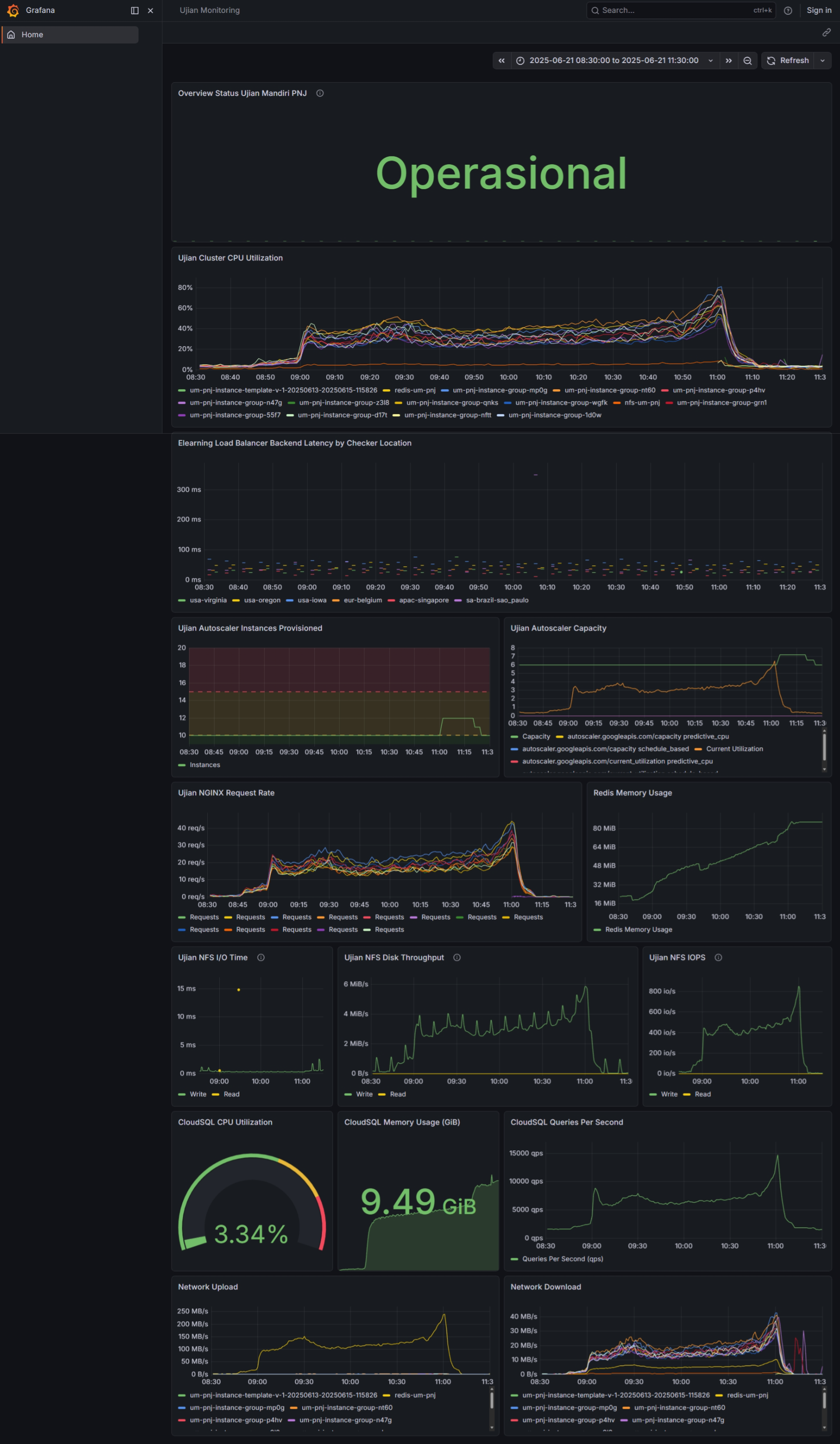
We'll break it down one by one
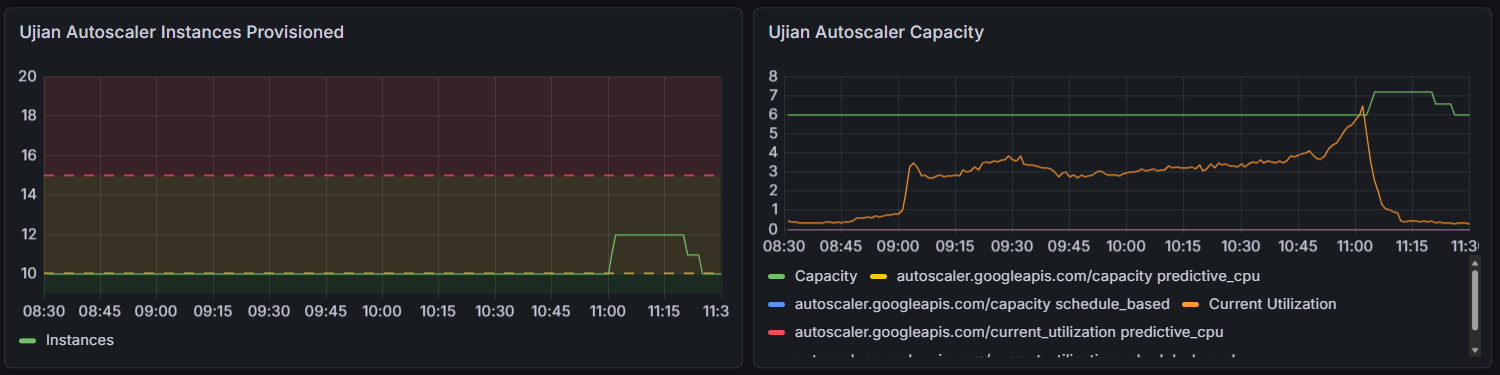
Pre-Scaling vs. Autoscaling
I didn't want to gamble on the autoscaler waking up in time for the 8:00 AM login rush. I preemptively spun up 10 web servers before the exam started. As you can see in the Autoscaler Capacity graph, this "pre-warming" handled the load perfectly for 90% of the duration. However, during the submission crunch, the system realized 10 wasn't enough and automatically spun up 2 extra instances to handle the final rush.
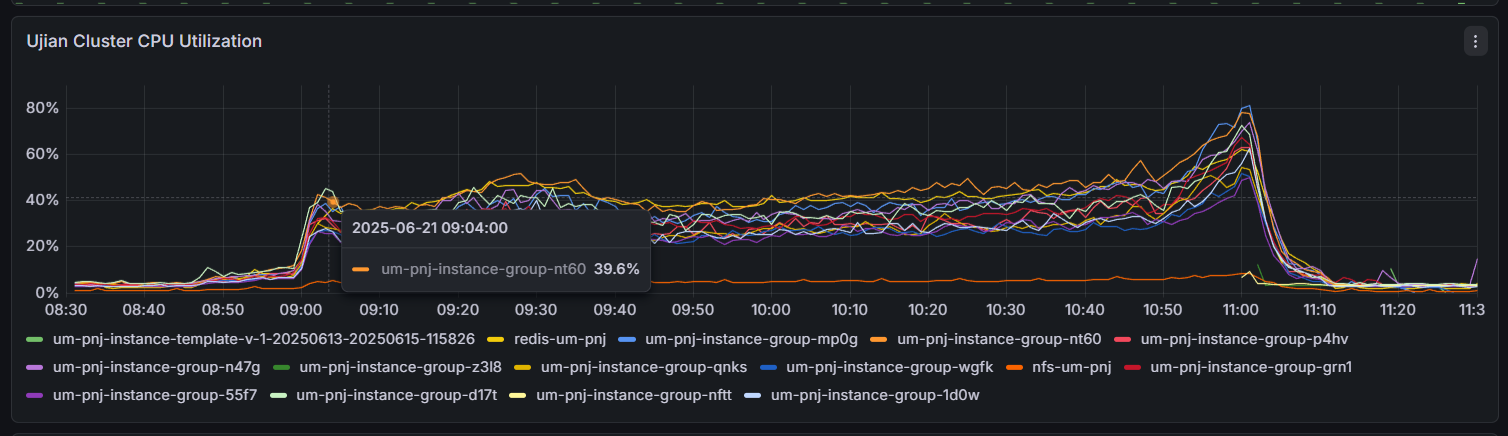
The CPU usage was distributed evenly among those instances
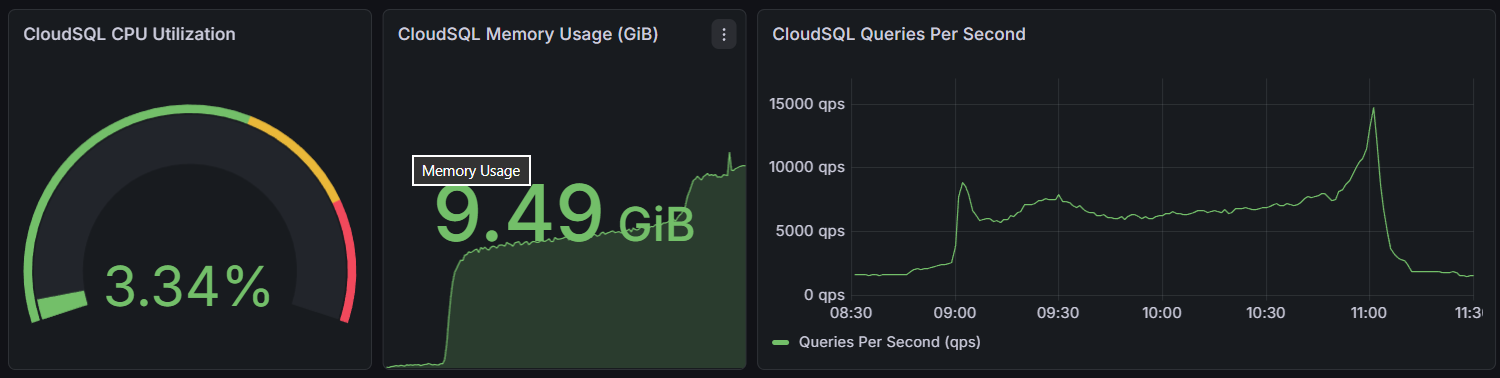
The "Overkill" Database
The most telling metric is the Cloud SQL Queries Per Second (bottom right). Right near the submission deadline, we hit ~15,000 QPS. While the database CPU sat at a bored 3.34% for most of the exam, during that spike, it jumped to ~50%. If I had cheaped out and chosen a smaller instance type, that 50% spike would have been a 100% lock-up, exactly the kind of failure we saw last year. We paid for headroom, and we used it.
Redis Efficiency
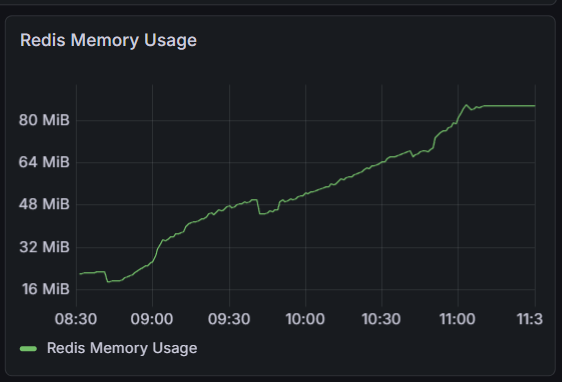
Despite thousands of concurrent sessions, Redis Memory Usage barely touched 100MB. The network traffic charts, however, show that Redis was moving a massive amount of internal data, proving that offloading sessions from the web servers was critical.
The Invisible Traffic: Network Stats
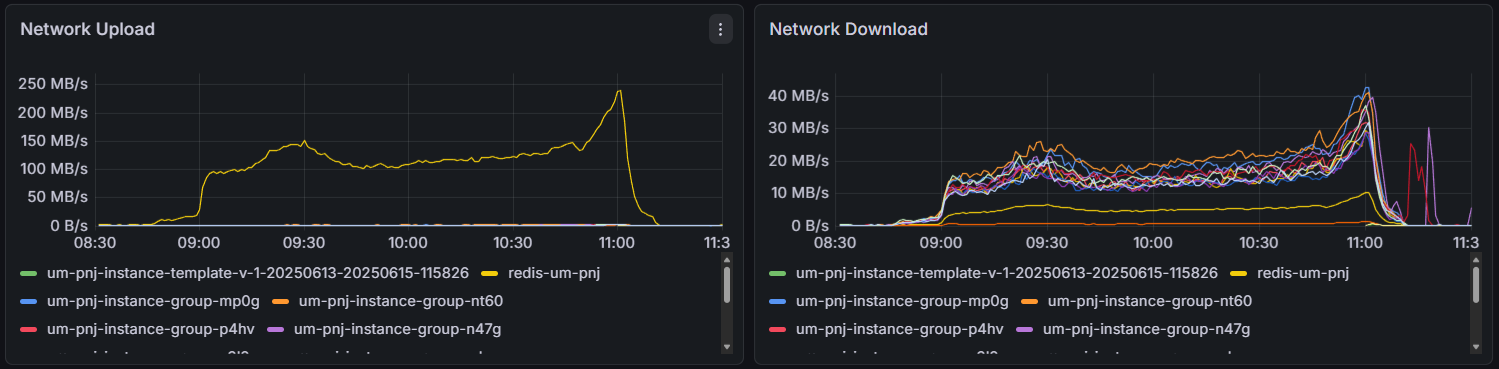
If you look at the Network Upload graph (bottom left), you’ll see it peaking at a massive ~250 MB/s. You might assume this was 3,500 students uploading their exam answers simultaneously.
It wasn't. The actual data sent to students (Network Download) peaked at only ~40 MB/s.
So, what was consuming that extra 200+ MB/s of bandwidth?
- Redis & The Database: Every time a student clicks "Next Page," the web server has to pull session data from Redis, query the database, process the logic, and push the updated session back to Redis.
- The Lesson: This traffic is invisible to the end-user, but if we had choked the internal network bandwidth (or used a lower-tier network class), the site would have felt slow, even if the CPU was bored. The "Upload" graph proves that for Moodle, the internal network pipe is just as critical as the public internet connection.
The Bill: The Ultimate Metric
You might think spinning up 8-core databases and clusters of web servers is expensive. Total Cost: ~440 USD.

How?. Even though I started preparing a month in advance, I was aggressive about turning things off.
- Testing phase: Spin up, test, shut down.
- Idle time: When machines are off, you only pay for the persistent disk storage (pennies).
- The Event: We only ran the full cluster for the few hours it was needed.
This is the perfect use case for the cloud's "Pay-as-you-go" model. We rented a supercomputer for a morning, and then returned it.
Conclusion
Looking back, that Rp 6.9 million (~$440 USD) wasn't just an infrastructure cost it was an insurance policy.
We effectively rented a Tier-1 enterprise architecture for the price of a mid-range Android phone. If we had tried to save that money by running on-premise or skimping on database specs, the reputational cost of a crashed exam would have been 100x higher.
Let’s look at the economics. If you take the registration fee per student and multiply it by 4,500 applicants, you’ll see that this cloud bill represents a tiny fraction of the revenue generated by the event itself. You can do the math, the infrastructure cost is practically a rounding error. Your institution has the budget for this. The only question is whether you want to allocate it to ensure a flawless experience, or risk saving pennies to lose reputation.
For any university IT team reading this: Don't be afraid of the cloud bill for temporary events. The ability to scale up to a supercomputer for breakfast and scale down to zero by lunch is a superpower you should be using.